For listing photos
Marble Images
The image studio built for real-estate listings. Stage, declutter, sky-replace and re-light in seconds.












Everyday Image Studio.
One workflow for every listing photo.
Virtual staging
Drop furniture, rugs and decor into empty rooms — scaled, lit and styled to match the space.
One project.
Every photo operation.
Virtual staging
Drop in furniture that matches the room's style, scale, and lighting.
Declutter
Remove cables, mugs, and personal items in one pass.
Sky replace
Trade flat skies for golden-hour drama.
Light & relight
Even out exposure and white balance automatically.
Day → Dusk
Convert midday exteriors into warm dusk shots, windows lit.
Watermark
One brand mark, baked into every export. Set it once per workspace and every photo your team ships carries the same badge.
One photo. One drag.
See the difference.
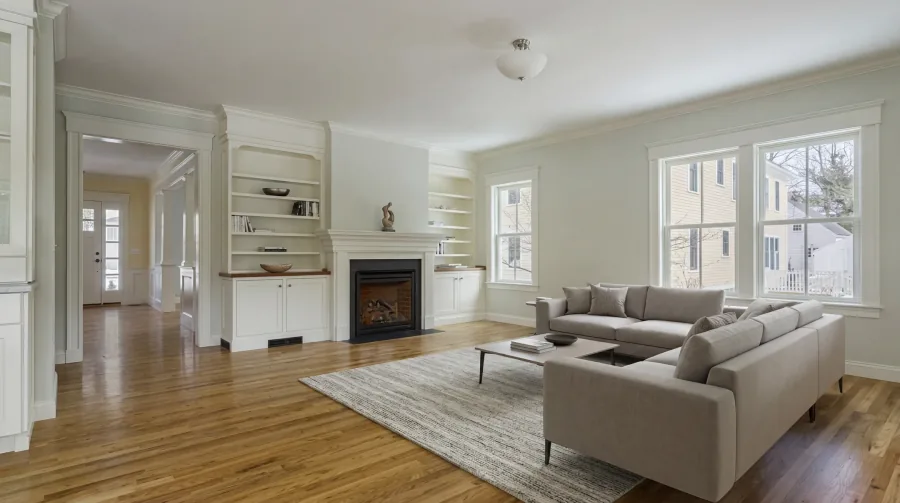
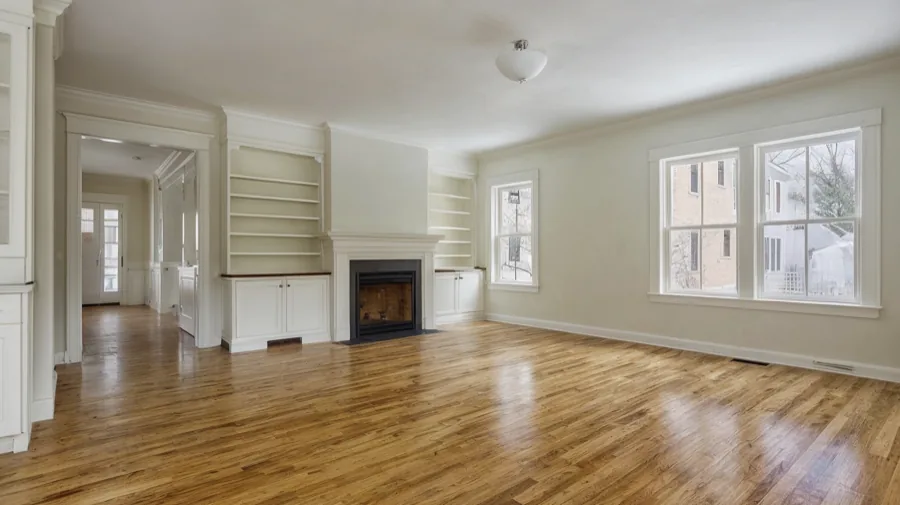 BeforeAfter
The complete AI stack for your team.
Simple enough to start. Powerful enough to grow.




Questions & answers
Depending on what you want to achieve, you can preserve room geometry, window placement, fixtures and finishes. Staging adds furniture; declutter removes movable items; sky-replace and light only touch lighting.
Anything from a recent iPhone wide-angle up to a full-frame DSLR works. Marble runs an automatic upscale + denoise pass, so even sub-12-megapixel shots come out clean at MLS and brochure scale.
Most edits finish in 8 to 20 seconds. Day-to-dusk conversions and complex virtual stagings on a large room can take up to a minute. Queue a full listing and walk away — you'll get an email when the batch is done.
Yes. Drop a whole listing folder in, pick the operations you want applied to each photo (or per-photo), and Marble runs the batch in parallel. Exports drop into a single zip ready for your MLS or portal.
If you own or are licensed to use the photo (your own shoot, a paid photographer assignment, or a listing where you have edit rights), Marble's output is yours. We retain no rights to the input or the export.
Yes. Set your logo, colour palette, and watermark position once per workspace. Every export from any team member uses those defaults — no per-file step.
Try Marble for free.
Book a 20-minute team demo. Or talk to sales.